

BROWSER DEBUGGING GUIDE
Why Does an API Request Work in Postman but Fail in the Browser?
If an API returns 200 in Postman but fails from your frontend, the endpoint may be fine. The difference is often the browser context: CORS, preflight, cookies, credentials, redirects, or the current session.
Postman returns 200 OK. The same URL works with curl. Your frontend fails: a CORS error, 401 Unauthorized, or no request in the backend logs. Sometimes the server returns a successful response and JavaScript still reports a failure.
A successful Postman request proves that the server can handle that HTTP request. It does not prove that the browser is allowed to perform or expose the same flow. Start by finding where the browser's behavior diverges.
| What you see | Check first |
|---|---|
Only OPTIONS reaches the server | CORS preflight |
Server returns 200, but JavaScript fails | CORS response headers |
401 or 403 | Authentication, cookies, credentials |
302 redirects to login | Session / authentication redirect |
Neither the request nor OPTIONS appears | Client-side/browser restriction or code path |
Postman and the browser test different contexts
A browser is not just another HTTP client. A page at https://app.example.com calling https://api.example.com/account makes a cross-origin request: the hosts differ. An origin consists of the scheme, host, and port.
The browser applies CORS, possible preflight checks, cookie policies, credentials rules, and redirects within the current session. Postman may instead use a manually supplied bearer token or its own cookies.
Postman Desktop and the Desktop Agent send requests without the page's browser CORS limitations. A success there does not rule out a browser-specific problem; the Postman Browser Agent still has browser limitations.
First question: was the real request sent?
Open DevTools Network before repeating the user action. Clear previous traffic and keep All selected so a filter does not hide the preflight.
Only OPTIONS appears
The browser may have stopped at preflight. A failed OPTIONS check can prevent the intended POST from reaching the server. A failed fetch row may still appear in Network; that alone does not prove the POST was transmitted.
The real request appears
If the intended request actually reached the server, investigate its headers, cookies, authentication, response, and redirects. This is a different branch from a blocked preflight.
If nothing appears, check whether the code ran, then inspect Console for restrictions such as Content Security Policy or mixed content.
CORS preflight: permission before the POST
Consider this request from another origin:
POST https://api.example.com/orders
Content-Type: application/json
Authorization: Bearer DEMO_ONLY
Either Content-Type: application/json or the Authorization header is enough to make this request non-simple and trigger a CORS preflight. The browser generates a permission check first:
OPTIONS /orders
Origin: https://app.example.com
Access-Control-Request-Method: POST
Access-Control-Request-Headers: authorization, content-type
Origin identifies the calling page. The other two headers declare the intended method and headers. An example permission response is:
Access-Control-Allow-Origin: https://app.example.com
Access-Control-Allow-Methods: POST
Access-Control-Allow-Headers: authorization, content-type
Compare requested permissions with allowed permissions. Missing authorization from the allowed headers can stop this POST before its body ever reaches the application.
POSTis a CORS-safelisted method. Seeing onlyGETin Allow-Methods is not, by itself, enough to explain a JSON POST failure; check the requested headers too. A non-safelisted method such asPUTmust be allowed explicitly.
Not every cross-origin request needs preflight. A basic GET with only safelisted headers can skip it; successful preflight permissions can also be cached. See the MDN preflight explanation.
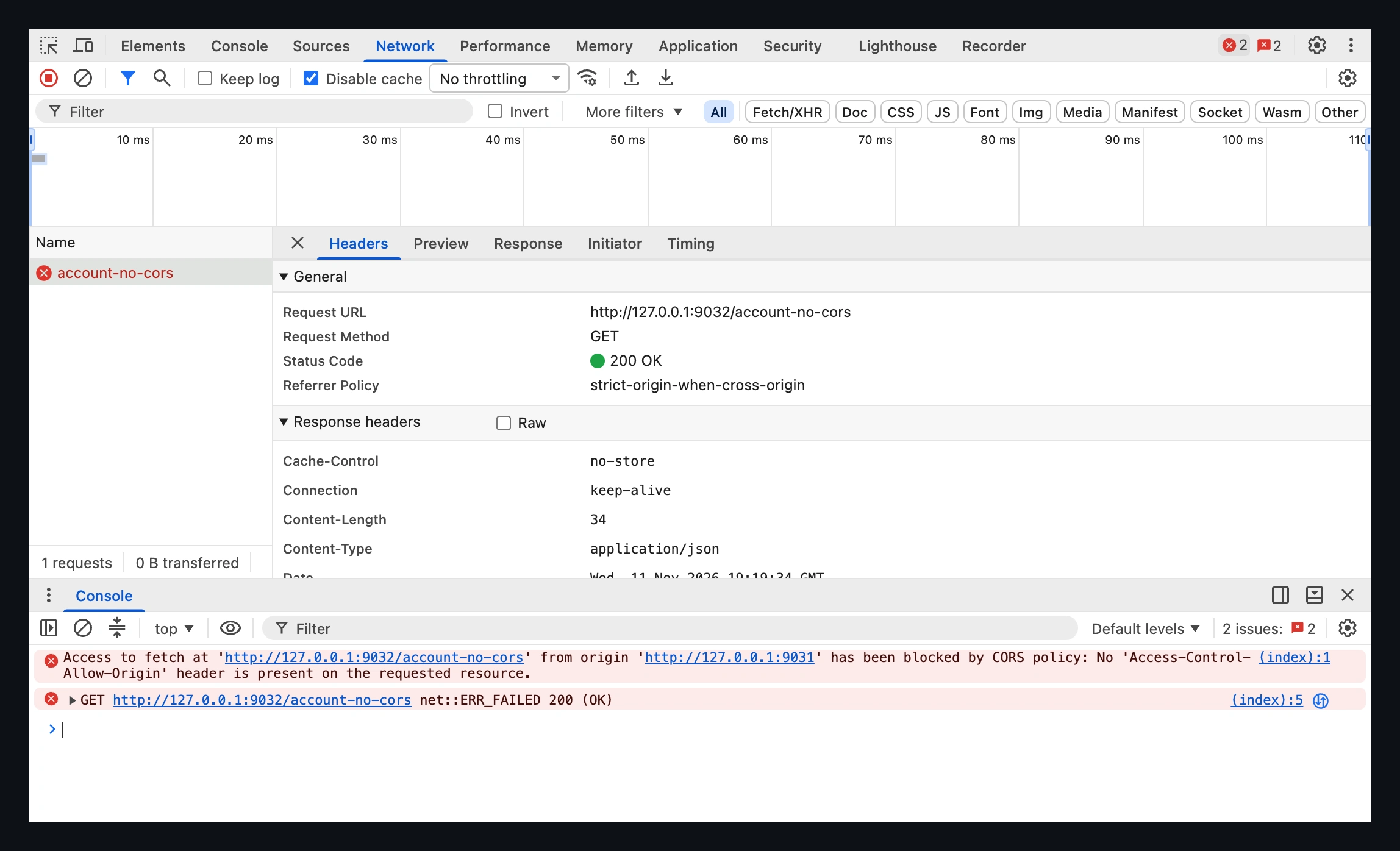
These captures use isolated local origins on different ports and public demo data.
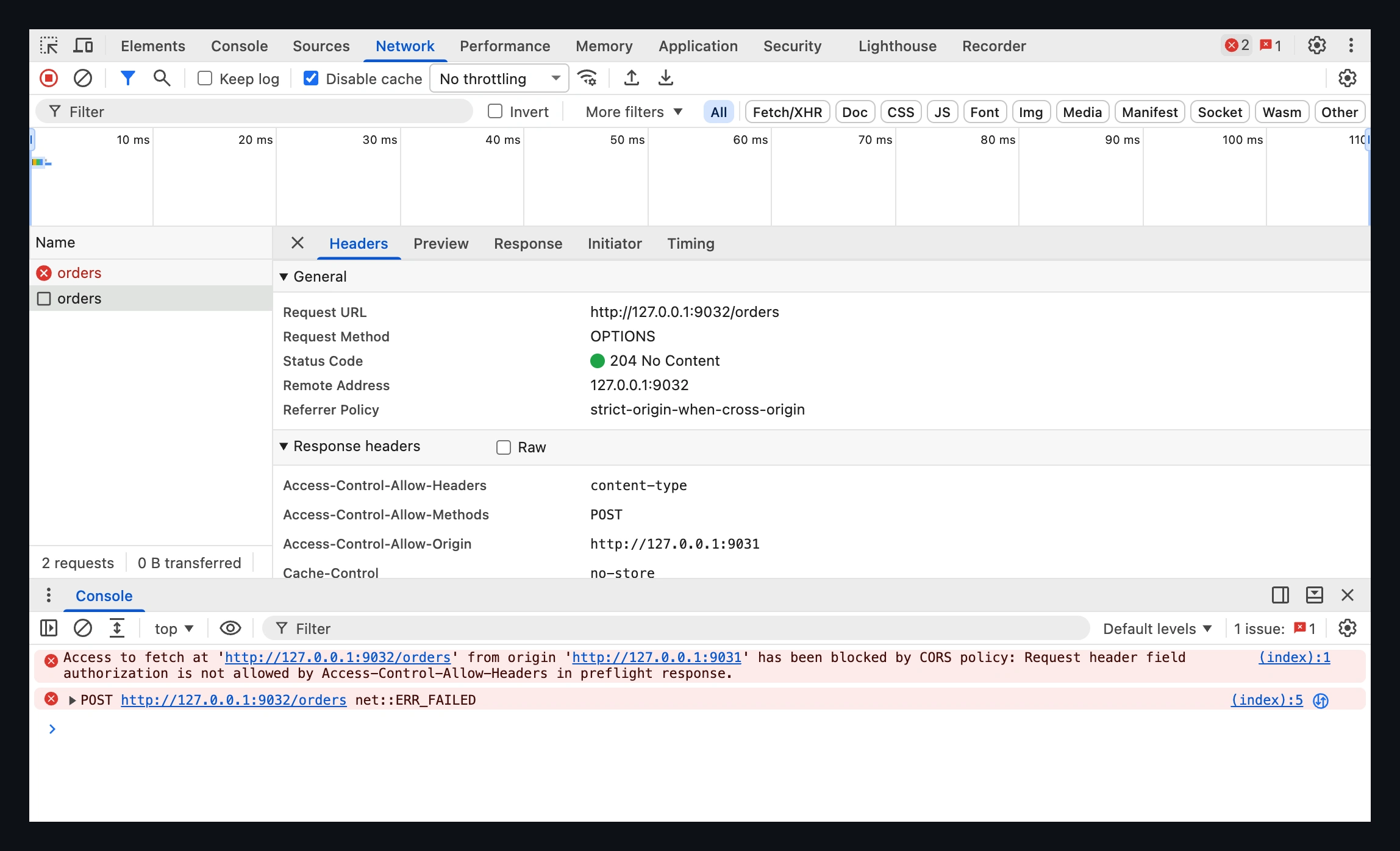
The server returned 200, but JavaScript still failed
A request can reach the server and receive 200 OK while CORS prevents the calling JavaScript from reading the response. A basic cross-origin GET without a valid Access-Control-Allow-Origin response header demonstrates this distinction.
Browser sends request
      ↓
Server returns 200
      ↓
CORS check fails
      ↓
Frontend cannot use response
The backend's success log describes server processing, not successful delivery to application code. Inspect both Network and Console; Chrome may label the request as a CORS error while its Headers view records the HTTP status.
Browser session and credentials
An API client using a valid bearer token and a frontend relying on an expired session are testing different authentication states.
These calls can also behave differently:
fetch("https://api.example.com/account");

fetch("https://api.example.com/account", {
  credentials: "include",
});
Fetch defaults to credentials: "same-origin". Browser-managed credentials, including cookies, are included by default for same-origin requests. Cross-origin cookie authentication generally needs include; the option also affects whether Set-Cookie is respected.
It does not log the user in, create a bearer token, or override cookie restrictions. An explicitly supplied Authorization header is a separate input: inspect it directly rather than assuming include supplies it.
Cookie exists, but is not sent
Seeing a cookie under Application → Cookies does not mean it belongs on this particular request. Inspect Network → request → Cookies and any blocked-cookie reasons.
Check the cookie's scope and attributes:
- Domain: a host-only cookie for
app.example.comis not sent toapi.example.com. - Path: a cookie scoped to
/admindoes not match/account. - Secure: requires HTTPS, with a localhost exception.
- SameSite:
Strictrestricts delivery to same-site contexts.Laxallows certain top-level navigations, not arbitrary cross-site fetches. - SameSite=None: permits cross-site delivery but requires
Secure; browser third-party cookie policies can still prevent it.
Cross-origin and cross-site are different. The two HTTPS subdomains above are cross-origin but normally same-site. Fetch's credentials mode still matters between them.
Copying a cookie into Postman bypasses this browser selection process; it proves the value is accepted, not that the browser may send it. MDN documents cookie attributes and their constraints.
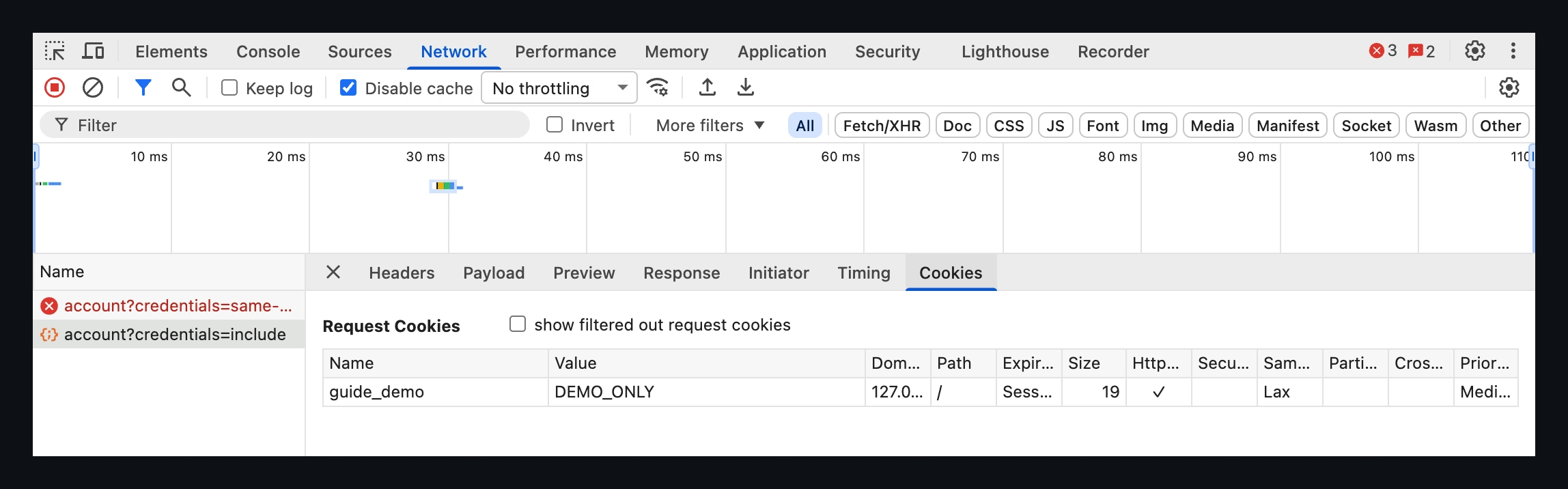
credentials: "include", the demo cookie reaches the API. The earlier cross-origin request using the default credentials: "same-origin" omitted it and received 401.Credentialed CORS needs server permission too
For a cross-origin fetch using credentials: "include", the server must allow the specific calling origin and credentials:
Access-Control-Allow-Origin: https://app.example.com
Access-Control-Allow-Credentials: true
Access-Control-Allow-Origin: * cannot authorize a response for this credentials mode, even if no cookie was actually sent. The preflight, when required, must also permit the credentialed request; the preflight itself does not carry cookies.
Cookie eligibility, preflight permission, and response access are separate checks. Passing one does not guarantee the others pass. When returning an origin dynamically from an allowlist, also use Vary: Origin so caches distinguish responses.
Redirects can hide an authentication problem
An expired session can turn an API call into this chain:
/api/account → 302 /login → HTML login pageFetch follows redirects by default. If the final response is accessible, code expecting JSON may fail with an error such as Unexpected token '<'. The parsing error is downstream of the authentication redirect.
Enable Keep log in Network and inspect the redirect chain, Location, final URL, content type, and body. A cross-origin redirect can introduce another CORS failure before parsing even starts.
“The same request” may no longer be the same flow
Copy as cURL → import into Postman → 200 is useful evidence. It helps compare method, query, body, and headers.
It does not reproduce browser enforcement. A copied Origin header does not make curl apply CORS; a copied cookie is a snapshot rather than a live browser session. Credentials settings, browser-managed headers, cookie selection, and redirect handling can differ.
Compare what actually left the browser and what happened around it, alongside the successful copied request.
Practical debugging order
1. Identify the user action
Choose one action, such as Save or Open Billing. Open Network first, clear old entries, and reproduce once.
2. Find the request
Look for the intended endpoint and any OPTIONS. Remove filters before concluding that nothing was sent.
3. Resolve preflight first
Compare Origin, requested method and headers, and the server's allow headers. Do not debug the body of a POST the browser never sent.
4. Compare the real request
Check method, query, content type, headers, cookies, and authorization against the successful request. Confirm the expected session is active.
5. Inspect the complete response path
Check status, CORS headers, Set-Cookie, redirects, and actual body. Distinguish an API response from a login page.
6. Read Console
Network shows the exchange; Console can explain browser enforcement. A 401 or 403 needs authentication or permission investigation, even if missing CORS headers also hide its body.
Do not “fix CORS” blindly
Before adding Access-Control-Allow-Origin: *, establish whether preflight was required, which Origin was sent, whether credentials were involved, which method or header triggered preflight, and exactly which permission failed.
Then change the relevant server or proxy configuration. A broad development allowance can conceal the underlying mismatch, and a wildcard does not solve credentialed CORS.
Where PayloadPigeon can help
PayloadPigeon does not bypass CORS or disable the browser security model. Incorrect CORS permissions require the appropriate application, server, or proxy fix.
For a one-off request/response inspection, Chrome DevTools may already be enough. When the bug exists inside a longer application flow, PayloadPigeon can help inspect surrounding HTTP/WebSocket activity while staying in that context:
User action → preflight? → real request?
    → response / redirect? → follow-up HTTP or WebSocket activity?
Use View Activity to narrow the investigation around an action. Once you understand the exchange, modify and resend a request to investigate backend inputs, or test frontend edge cases to check response handling. These workflows do not replace diagnosing browser permissions.
Compare the browser context
Postman working is useful evidence: it narrows the investigation toward the browser's execution context.
Before rebuilding the request again, check preflight, credentials, cookies, redirects, and the response the browser actually allowed your application to use.