

NETWORK DEBUGGING GUIDE
Why Is My Browser Sending the Same API Request Twice?
One click, two POST requests. Use an XHR/fetch breakpoint to find the second execution path, then work out whether it came from another handler, an Effect, a second click, or a retry.
You click Save once. In Chrome DevTools Network, the same POST appears twice.
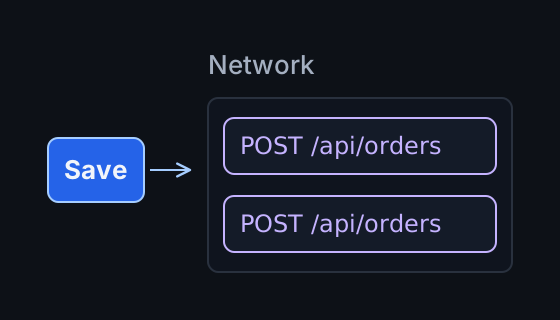
For GET /products, a duplicate usually means unnecessary work. For POST /orders or POST /payments, it can mean two orders, two charges, or two created records.
The useful question is: which code sent the second request? You do not need to start by searching the entire project for fetch().
First, confirm it is a duplicate request
These are two different requests:
OPTIONS /api/orders
POST    /api/orders
The OPTIONS request may be a CORS preflight: the browser checks permission for a cross-origin request before sending the actual POST. If preflight fails, the POST may never be sent. The browser context guide covers that distinction.
Two POST requests deserve investigation when their method, URL, query parameters, and request body match. Also compare their timestamps, status, and Initiator information.
A second request after a timeout or error suggests a retry. If two requests appear almost together, checking for two frontend execution paths is a good first step. Timing alone does not establish the cause.
Pause at the request with an XHR/fetch breakpoint
For a duplicated POST /api/orders, open Chrome DevTools and set a URL-based XHR/fetch breakpoint:
- Open Sources.
- Expand XHR/fetch Breakpoints in the debugger sidebar.
- Click Add breakpoint (+), enter
/api/orders, and press Enter. - Repeat the user action.
DevTools pauses when JavaScript attempts a matching fetch or XHR. Inspect Call Stack, then resume execution. If the request is attempted again, DevTools pauses again: compare the two stacks.
For example, the first stack may contain handleClick → saveOrder, while the second contains handleSubmit → saveOrder. Both paths reach the same endpoint; the difference is the caller.
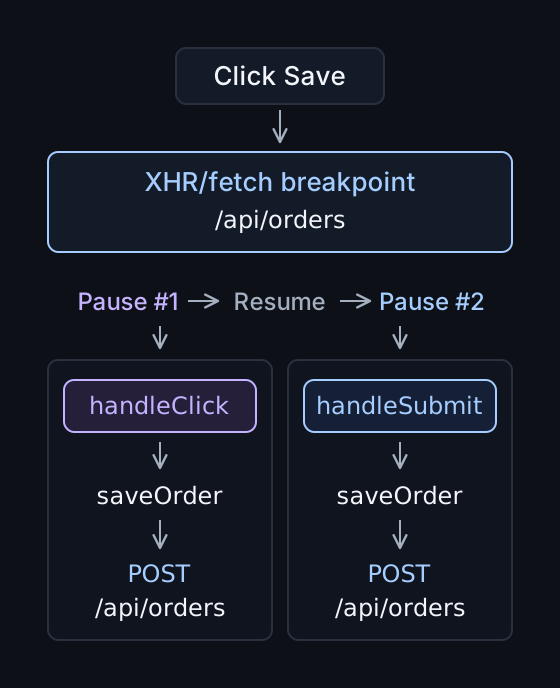
Find the second execution path that reaches the request. The same fetch() can run twice. Two pauses can also have identical stacks: the same path may have run again.
Case 1: one action triggers two handlers
A button inside a form can trigger both a click handler and a submit handler. This deliberately broken example prevents navigation so the duplicate calls are easier to see:
<form onsubmit="event.preventDefault(); saveOrder()">
  <button type="submit" onclick="saveOrder()">Save</button>
</form>
Clicking Save calls saveOrder() from click, then again from submit. In React, the same mistake looks like this:
<form onSubmit={(event) => {
  event.preventDefault();
  saveOrder();
}}>
  <button type="submit" onClick={saveOrder}>Save</button>
</form>
One button, two paths to the same request. Keep the save operation in the form's submit handler and remove the button's save handler. If the button should not submit the form, give it type="button" instead.
Similar bugs occur when initialization adds new listener functions repeatedly without removing the old ones. Comparing call stacks is often faster than searching for another request call.
Case 2: the request is inside a React Effect
During React development, this Effect can produce two requests:
useEffect(() => {
  fetch("/api/profile");
}, []);
GET /api/profile
GET /api/profileWith Strict Mode enabled at the app root, React runs an extra setup/cleanup cycle for Effects in development to expose missing cleanup. These checks do not run in production. See the official StrictMode documentation.
Strict Mode does not call your click handler twice. A request directly inside onClick={saveOrder} needs a different explanation from one inside useEffect.
Disabling Strict Mode hides a useful check. Ask whether the Effect handles repeated setup safely. When fetching data, cleanup should cancel the fetch or ignore an outdated result; it cannot undo server work that already happened.
This should raise a different question:
useEffect(() => {
  createOrder();
}, []);
Why does creating an order depend on the component mounting? If the operation belongs to a user action, put it in that action's handler. React's Effects guide explains why purchase-like operations should not run merely because a component appears.
Case 3: the user submitted twice
The user clicks Place order. The API is slow, and the interface gives no immediate feedback. They click again. The backend receives two POST requests because the frontend received two actions.
Show a pending state as soon as submission begins:
Click → request starts → button disabled
      → Saving… → response → pending state cleared
<button type="submit" disabled={isSaving}>
{isSaving ? "Saving..." : "Save"}
</button>Set isSaving before awaiting the response and clear it when the attempt finishes. Guard the submit handler against an in-flight operation too, so other submission paths respect the same state.
A disabled button reduces accidental repeat submissions. It does not protect against retries or guarantee that the backend receives an operation only once.
Case 4: the second request is a retry
Consider this sequence:
POST /orders
      ↓
Server creates the order
      ↓
Response never reaches the client
      ↓
Client treats the attempt as failed
      ↓
Retry → POST /orders
The user clicked once. The client sees one operation with a retry; the backend sees two POST requests.
Retry logic may live in an API wrapper, SDK, HTTP client, or data library. Check its configuration and error handling alongside the time between requests. A gap after a timeout is a reason to check retries, not proof that a retry occurred.
Repeating a GET is usually extra work. Retrying a payment can repeat a business operation. A failed client attempt does not prove that the server did nothing.
A practical debugging sequence
Rule out a preflight/POST pair, then compare method, URL, query, and body. For matching requests, set the endpoint breakpoint, repeat one user action, and resume to compare the pauses and call stacks.
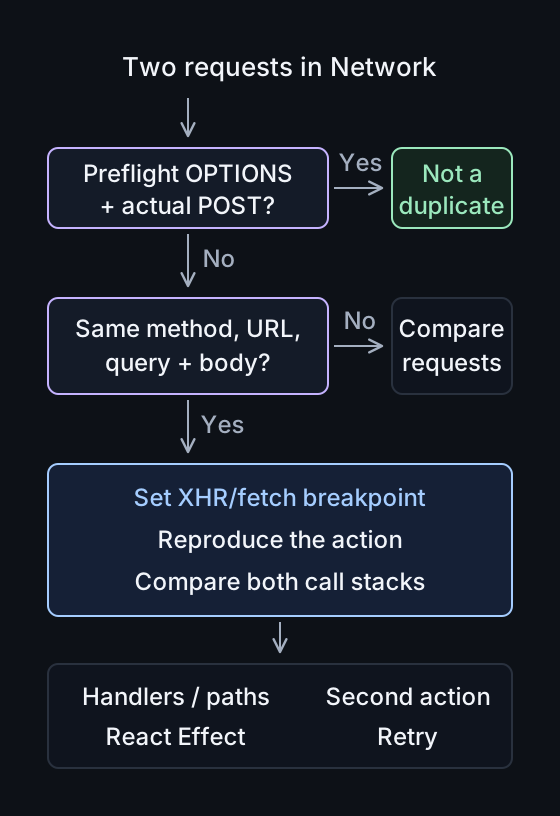
Then follow the evidence:
- Different handlers: check paths such as
onClick → saveOrderandonSubmit → saveOrder. - An Effect in development: check Strict Mode, dependencies, cleanup, and component remounts.
- A second UI event: check repeated clicks or submissions and pending state.
- A timeout or error before the second attempt: check retry logic.
Network shows the requests. The call stacks help explain how application code reached them.
What if the duplicate still reaches the backend?
Even after fixing the frontend, ask: what happens if the same logical operation arrives twice? Retries, lost responses, and repeated user actions can still happen.
Critical operations generally need protection at both levels:
Frontend → reduces accidental repeat submissions
Backend  → handles repeats of one logical operation safely
For orders and payments, that often means server-side idempotency: repeated attempts with the same idempotency key reuse the outcome of one logical operation instead of creating it again. Reuse the key for retries of that operation; a new key on every attempt defeats the protection.
A read-only GET /products usually does not need this mechanism. Choose idempotency or deduplication to suit the operation's semantics; not every POST endpoint needs the same design.
Where PayloadPigeon can help
For one reproducible endpoint, Chrome DevTools and an XHR/fetch breakpoint may already be enough.
The investigation gets harder when one action starts a longer sequence amid background traffic:
Click Save
      ↓
POST /settings
      ↓
GET /profile
      ↓
WebSocket: profile.updated
      ↓
GET /permissions
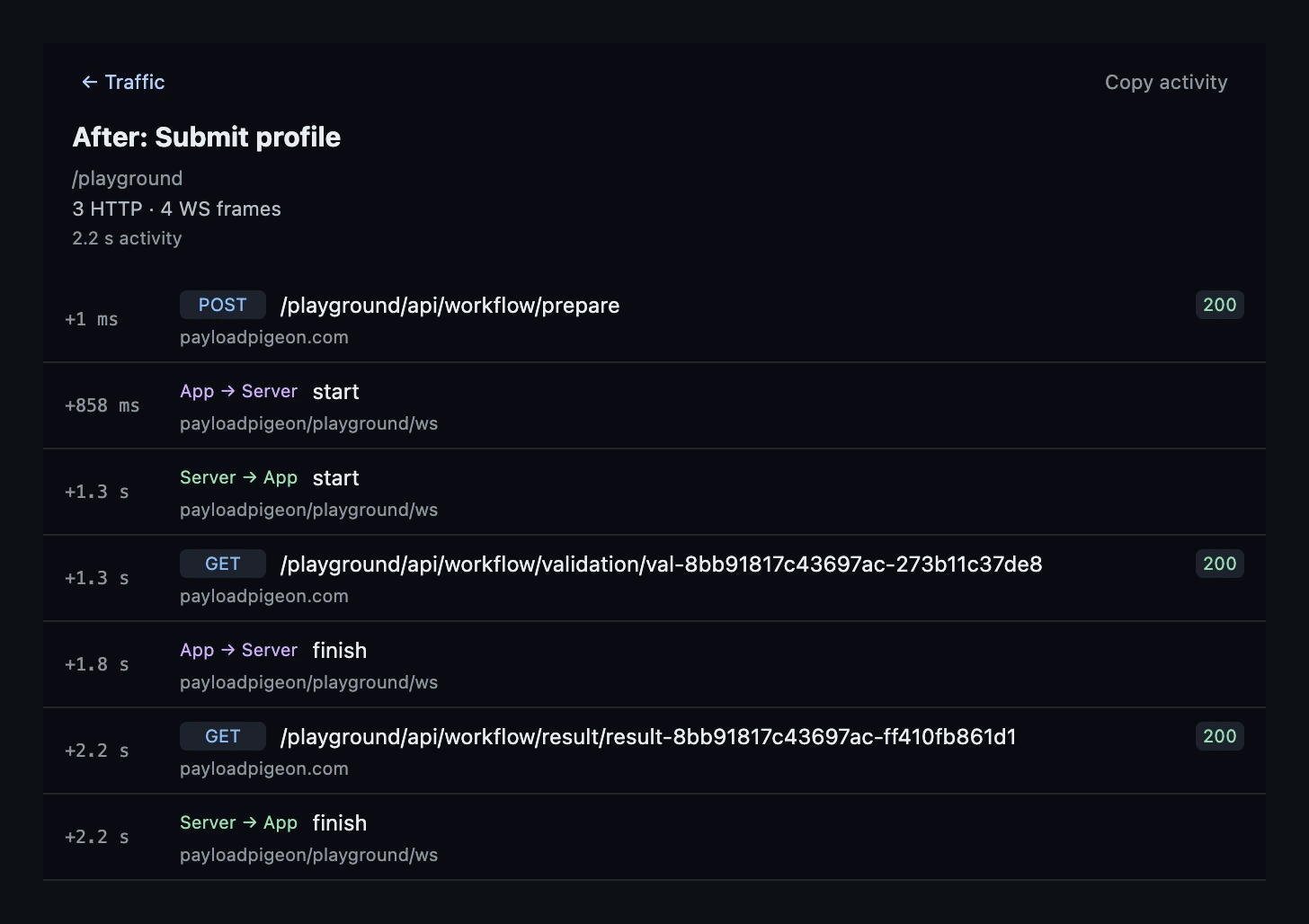
Somewhere in that activity, a second POST /settings appears. You need to inspect the wider HTTP/WebSocket sequence around the interaction.
View Activity in PayloadPigeon narrows that traffic to likely related events worth inspecting. It does not prove that the action caused every event. Use that context to refine the investigation, and use DevTools to trace the JavaScript execution path for the specific request.
Two POST requests are a symptom, not a diagnosis
The same two Network rows can come from duplicate handlers, an Effect, a second click, or a retry. Each needs a different fix.
Set the endpoint breakpoint, reproduce the action, resume, and compare the stacks before changing code.
When one user action produces two requests, trace both attempts and compare how the code reached the request each time.