

MANUAL TESTING GUIDE
Manual Test Run: Build a Regression Suite You’ll Actually Use
Keep useful manual test cases, build a regression suite, and record each manual test run with PayloadPigeon. Start from your application’s real traffic.
You tested the happy path. Then you changed a response, checked the empty state, tried an error, found an awkward edge case, fixed it, and tested again.
Three weeks later, you return to the same feature.
What exactly did I check last time?
You remember being thorough. You do not remember the response you changed, the page state that exposed the bug, or the other checks you made afterward.
The work happened. The useful part—the scenario you discovered—never became something you could reliably return to.
Your next manual test run should start with the checks you kept, not with detective work.
This is not an argument against unit, integration, or automated end-to-end tests. It is about the useful manual test cases you still perform in a running application—and how to turn them into a regression suite you can use again.
The check was easy. The useful question was harder to find.
Clicking Search again is straightforward.
Remembering why you once tested an empty response with previous results still on the page is less straightforward.
That detail matters. An empty result might look fine on a fresh screen and leave stale content behind on a screen that already contains data.
The valuable part of the check was not the click. It was the question:
When the next search returns nothing, does the application clear what was there before?
You do not need to rediscover that question every time you change the feature.
You need to keep it.
Turn real responses into manual test cases
Imagine a search screen that already displays several items. You submit another search, but this time you want the application to receive an empty result set:
{
  "items": [],
  "total": 0
}
This is an illustrative response, not a universal API contract or a built-in Playground scenario. Use the fields and values your application expects.
Now look at the page, not just the JSON.
Did the previous items disappear? Is the empty state clear? Can the user search again? Does the page stop showing a loading indicator?
Suppose the empty-state message appears, but the old items remain underneath it. You have found a specific problem—and a specific check worth repeating.
A useful name is not Test request 7.
It is Search — empty response clears previous results.
That name preserves the reason the test exists. Keep the setup and expected behavior in your accompanying notes or task documentation, too: the page must contain old results before the next search begins.
Start with the application you already have open
There is no need to start this investigation with a request invented from scratch.
The application is authenticated.
The right environment is open.
The network path is already working.
Any VPN or development tunnel you need is already in place. You have reached the relevant screen, and the application is generating the traffic you want to investigate.
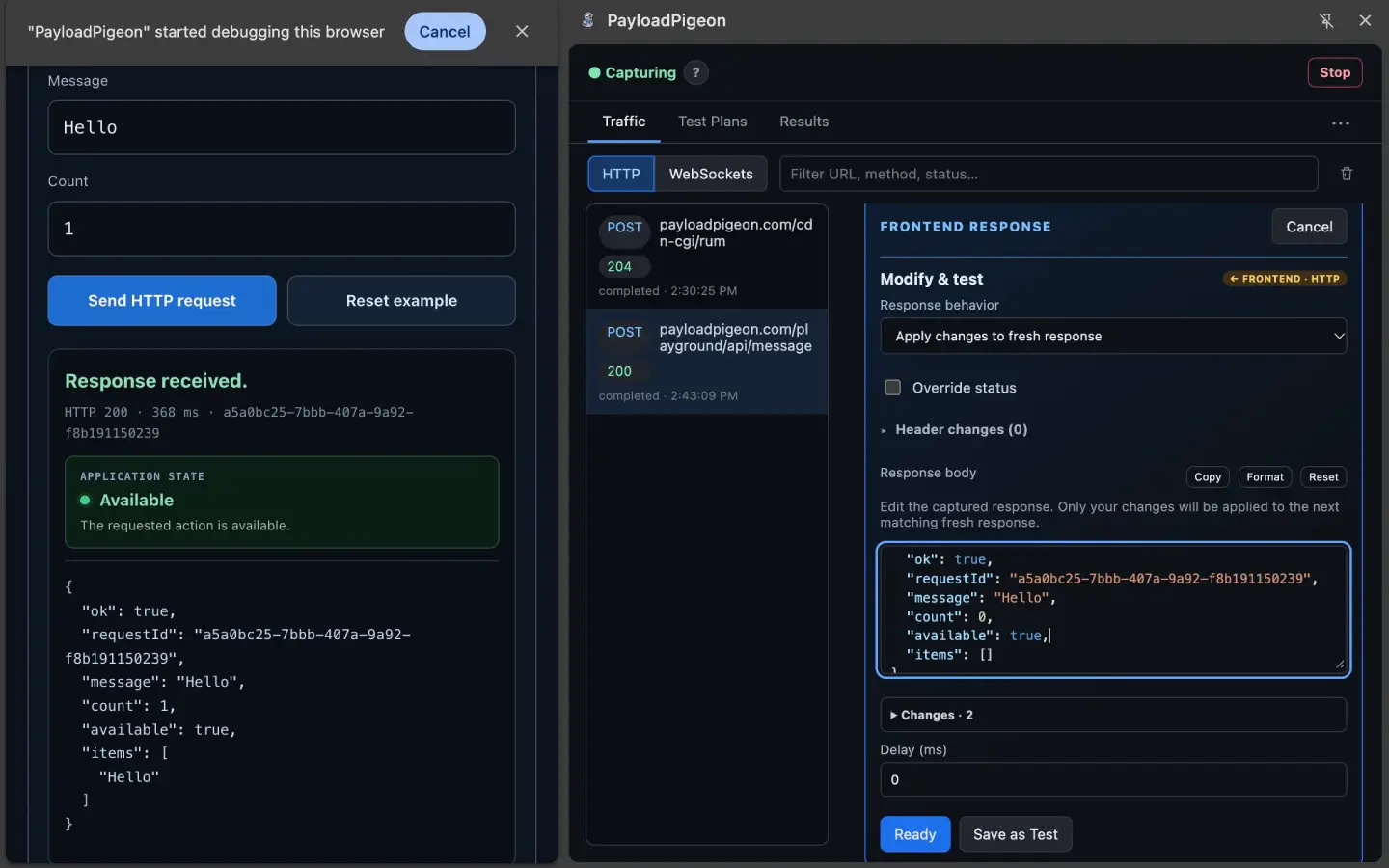
PayloadPigeon keeps the testing controls beside that application in Chrome’s Side Panel. Start Capture for the tab, perform the search, and find the matching HTTP exchange in Traffic.
For the empty-results scenario, open Modify & test. Where supported, choose Apply changes to fresh response and change the relevant JSON fields. Keep related values consistent—for example, both items and total—while leaving unrelated fresh values alone.
Select Ready, then submit the search in the application.
Ready prepares the scenario. Your action in the application triggers it.
You can now investigate the real page in the state that matters, without changing the backend just to produce this frontend response.
This does not restore an expired login or create a tunnel. For a separate Backend HTTP Send, review the destination and credential mode; Current session only resolves an eligible recent captured credential header. The usage guide explains those boundaries.
Save the question, not just the request
This is the point where a useful experiment can become more than a temporary debugging session.
Choose Save as Test, give the scenario its behavior-focused name, and add it to a Test Plan. Complete the existing saved-data protection or unlock step when prompted.
The saved Test keeps the network scenario. Your notes explain the starting state and what you expect to see.
It does not record every click or reconstruct the whole application for you. But you no longer have to rebuild the response change or remember why you made it.
One distinction is important: a temporary action in Traffic does not become a historical Result just because you save it afterward. Execute the saved Test, inspect the behavior, and record your assessment to keep that outcome.
You can practice Capture, Save as Test, and result recording in the PayloadPigeon Playground before using them on your own test environment.
Build a regression suite around the feature
Once you have saved the empty-results check, the next few cases become easier to identify.
What else would you regret forgetting when this feature changes?
For a search screen, your first regression suite might look like this:
| Manual test case | The question it preserves |
|---|---|
| Successful results | Does the page display the returned items and finish loading? |
| Empty results | Do previous items disappear when the next result set is empty? |
| Server error | Does the page show the intended failure state rather than success or endless loading? |
| Delayed response | Is the waiting state usable, and is the eventual response handled correctly? |
| Missing optional field | Does the page use the expected fallback when a field allowed to be absent is missing? |
These are suggested cases, not built-in assertions. The expected behavior still comes from your requirements—not from whatever the application happened to do during the first capture.
In PayloadPigeon, put the related Tests into a Test Plan, such as Search and filters.
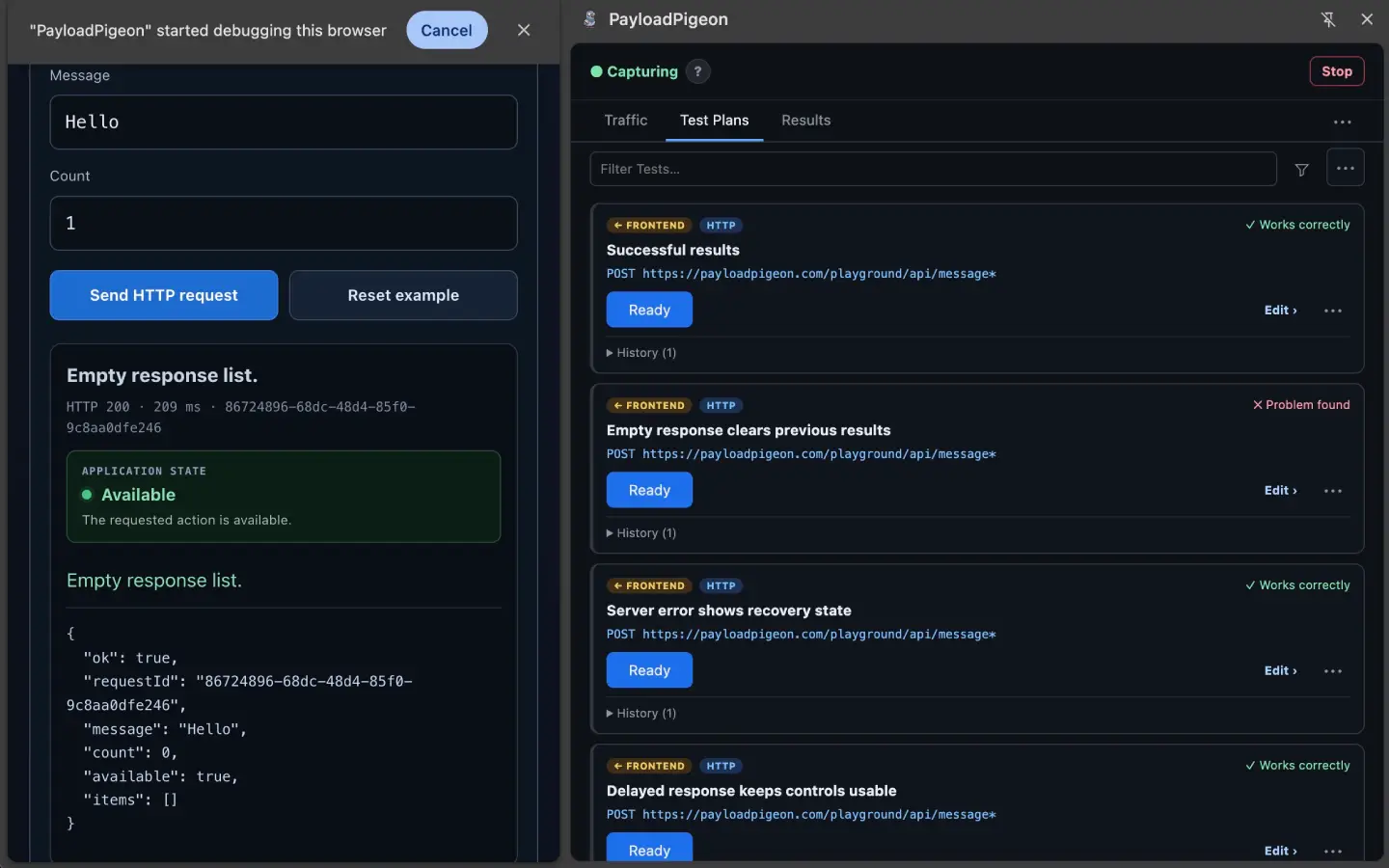
That Plan holds your feature-focused regression suite. It is a collection you can revisit, not an automatic batch runner.
A Plan can contain supported HTTP and WebSocket Tests. For a message-driven feature, the WebSocket testing guide explains how to work with the application’s supported connection and messages.
Keep a test case library, not a request archive
Saving everything is not the same as testing well.
A test case library becomes useful when the cases answer different, important questions—not when it contains every request you captured.
Keep manual test cases that have found a bug, expose a meaningful failure state, are awkward to reconstruct, or protect behavior the next change could easily disturb.
Keep the names specific. Search — delayed response keeps controls usable tells you more than Delay test.
Also keep the limits clear. A saved network scenario does not replace checks for keyboard navigation, focus order, or every visual detail. Keep those in the checklist or tool you already use alongside the network-dependent cases.
The library is not proof that the feature works. It is a set of questions you know are worth asking.
The next manual test run starts here
Then comes the next change: new filters, a response-model update, a state-management refactor, or an AI-assisted edit.
Instead of wondering what else to check, open the Test Plan.
A manual test run is this occasion of executing selected cases against the current application and recording what happens. The cases are reusable; today’s outcomes are new.
Prepare the screen, sign in normally, and start Capture. If Saved Data is locked, select Unlock and wait for the library to load.
For a frontend Test, select Ready and perform the matching action in the application. For a backend Test, review what will be sent and select Send. Supported WebSocket Tests also need a suitable live connection; the WebSocket guide covers its setup.
Send can have real server-side effects. Use systems you are authorized to test and safe development or staging data.
After each saved-Test check, inspect the behavior and choose Works correctly or Found a problem.
A failure response can be part of a successful frontend test. If you deliberately return an error, the question is whether the application handles it correctly—not whether the server response looks successful.
Do not let last week’s pass become today’s pass
A previous Result tells you what happened during a previous check. It does not validate code that changed afterward.
For a new full cycle, use Restart check to reset the Plan’s current-check statuses. It does not execute the Tests or turn their old Results into new ones.
Keep the scope honest. Rechecking the empty-results bug answers “does this problem still reproduce?” Running the other relevant cases asks “did the fix affect something else?”
Both can matter. They are not the same check.
A useful Result tells you what to look at next
Compare these two notes:
Search failed.
And:
Case: Search — empty response clears previous results.
Expected: Previous items disappear and the empty state appears.
Observed: The empty-state message appears, but old items remain underneath.
Verdict: Found a problem.
The second note is an illustrative example, not a test result collected for this article. These labels organize the note; they do not imply separate fields in the interface.
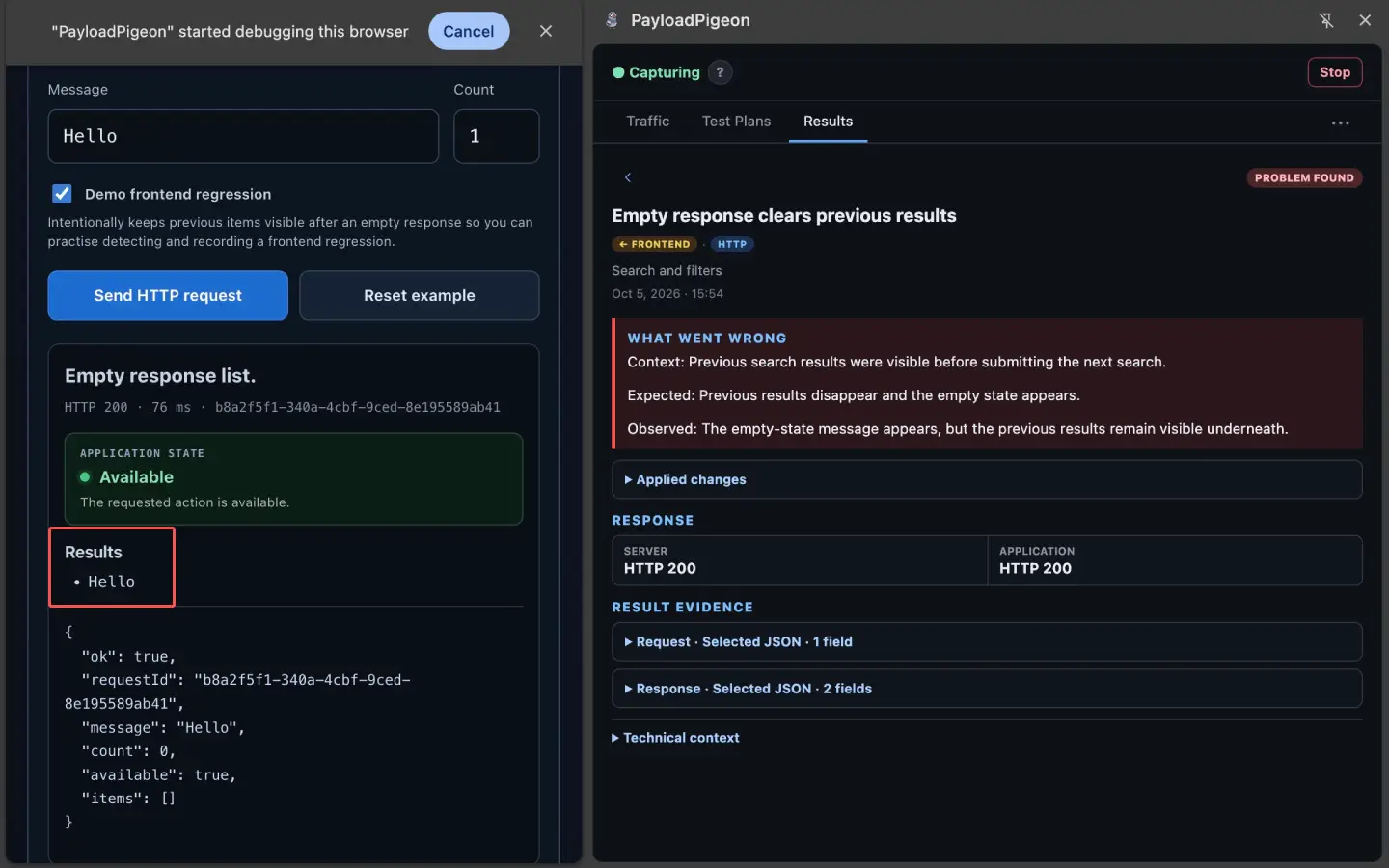
After a fix, you know exactly what to look at.
Add the build or change, environment, and setup to your notes where useful. Do not assume the extension records all that context automatically.
A Result can also include explicitly selected payload evidence, such as relevant JSON or an available full sanitized payload. Sometimes a small fragment explains the problem better than a large capture.
Keep what helps you understand the outcome later, and review it before sharing. Evidence selection is not a recording of the entire browser session or a guarantee that every sensitive value has been removed. The data and security guide explains the boundaries.
Let the regression suite improve—not just grow
A saved check is not a permanent specification.
Requirements change. Optional fields become required. A response that once represented an error becomes valid. An old identifier stops referring to the operation you are testing.
Update the case when its purpose changes. Remove duplicates. Keep delayed delivery and server failure separate when they exercise different behavior.
Your test case library should help you test the current product, not preserve every past assumption.
It can also point toward automation. If a case is stable, important, and repeated frequently, consider automating it at the appropriate level. You already have a clearer description of the setup, the condition, and the expected behavior.
PayloadPigeon does not automatically turn the Plan into a Playwright or Cypress suite. It helps you keep the useful checks while you decide which ones belong in automation.
The same applies when AI changes the implementation. Running the relevant manual test cases gives you another way to inspect the result alongside code review and automated tests—not a guarantee that the whole application is correct.
Start with one bug you do not want to find twice
You do not need a hundred tests or a new QA process to begin.
Open the feature you are working on. Capture one relevant interaction. Try the condition you are worried about. When the check proves useful, save it as a Test.
Add the next worthwhile check to the same Plan. After the next change, run those Tests again and record new Results.
That is how a practical regression suite starts: not by deciding to document everything, but by keeping the good testing questions you have already asked.
Add PayloadPigeon to Chrome, or try the workflow with synthetic data in the Playground.
Make your next manual test run a repeat of useful checks—not an attempt to remember them.