

WEBSOCKET DEBUGGING GUIDE
WebSocket Messages Out of Order? Check These 3 Places
Your UI applies WebSocket updates in the wrong order — but the network may be completely fine. Check the network, async processing, and state updates before blaming WebSocket.
Your app receives two payment status updates:
#41 PAYMENT_PENDING
#42 PAYMENT_CONFIRMED
But the UI shows:
CONFIRMED
    ↓
PENDING
The user sees a successful payment, then a moment later the interface rolls back. Did WebSocket really reorder the messages?
Before blaming the socket, find where the order actually changed. There are three places to check:
Network → Application processing → State / UIEach needs a different fix. The key distinction is received order vs. applied order.
Check 1 — What actually arrived in Network?
Open the WebSocket traffic in your browser's DevTools or another network inspection tool. Look at incoming messages on the relevant connection, in chronological order.
If the capture shows:
#41 PAYMENT_PENDING
#42 PAYMENT_CONFIRMED
delivery order looks correct for these updates. Follow them into application code before investigating reconnects or backend delivery.
On a single connection, WebSocket preserves sending order; it does not guarantee the order in which your application finishes processing messages. The WebSocket specification defines the transport's ordering rules.
If the capture instead shows:
41 → 43 → 42or:
41 → 43Then check what the backend sent, whether the connection reconnected, and whether you are looking at more than one connection. A missing ID is a clue, not proof of message loss.
Use Network to decide where to investigate next.
Check 2 — Is async processing changing the order?
This handler looks straightforward:
socket.addEventListener("message", async (event) => {
  const message = JSON.parse(event.data);

  const result = await processMessage(message);

  updateUI(result);
});
Message 41 arrives first and starts processing. While it waits, message 42 arrives and starts processing too. If 42 finishes first, the UI applies 42, then the stale result from 41.
await pauses the current async function, not the whole message stream. Making the listener async does not queue subsequent messages behind it.
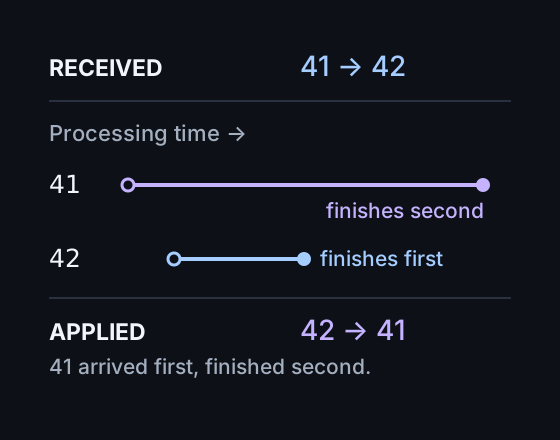
received: 41 → 42
applied:  42 → 41
That explains the rollback from PAYMENT_CONFIRMED to PAYMENT_PENDING: the older handler finished later and overwrote newer state.
Log RECEIVED and APPLIED
Logging only the message hides this distinction. Add a log when it arrives and another at the point where you update state:
socket.addEventListener("message", async (event) => {
  const message = JSON.parse(event.data);

  console.log("RECEIVED", message.id);

  const result = await processMessage(message);

  updateUI(result);
  console.log("APPLIED", message.id);
});
For this example, updateUI applies the result synchronously. If your framework queues the state update, put the APPLIED log where that update actually takes effect.
Now the logs can reveal:
RECEIVED 41
RECEIVED 42

APPLIED 42
APPLIED 41
The order changed between receipt and application. Investigate async processing.
Two ways to keep stale results from winning
Process sequentially when every update must be applied in order. Finish processing and applying 41 before starting 42:
41 → process → apply
                  ↓
42 → process → apply
Reject stale results when newer state replaces older state. If the messages carry a comparable version for the same piece of state, check it before applying a result:
lastApplied = 42
late result = 41

41 < 42 → ignore
Only discard older results when newer state actually supersedes them.
Check 3 — Who else writes to this state?
Suppose Network and processing both show the correct order:
WebSocket 41 applied
WebSocket 42 applied
Then an older response to GET /payment arrives and overwrites the payment status:
WebSocket    → CONFIRMED
HTTP response → PENDING
The UI still rolls back, even though both WebSocket updates were applied correctly.
Ask: who else can update this state? Check HTTP responses, background refetches, another WebSocket, and optimistic or local updates. Log the source alongside each state change.
HTTP and WebSocket often serve the same feature. Trace all the writers that can change the value on screen.
A three-step debugging flow
Start with the visible rollback and follow the evidence through each layer:
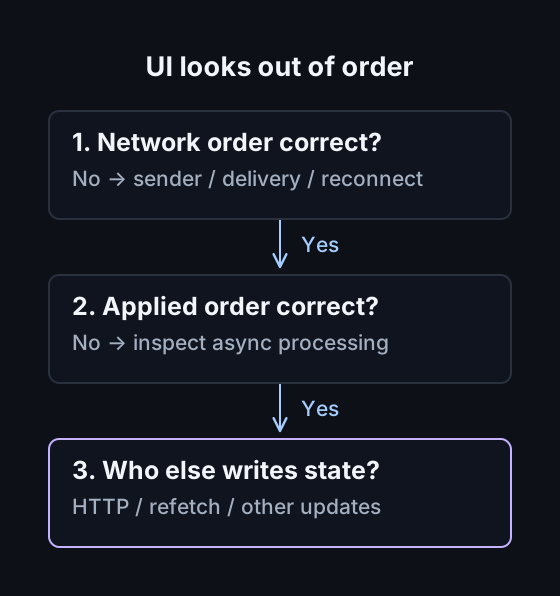
This gives you a concrete next step without having to untangle the entire realtime architecture at once.
Where PayloadPigeon fits
PayloadPigeon helps establish what happened in the network layer: inspect the WebSocket traffic and check whether the captured messages appear in the expected order.
If the capture shows 41 → 42 but the UI behaves like 42 → 41, move the investigation into application code. PayloadPigeon does not detect or fix async races.
Sometimes ruling out the network layer is the fastest debugging result you can get. To test how your UI handles a changed, delayed, or missing message, see the WebSocket testing guide.
Ask three questions: what arrived, what was applied, and who else changed the state? Find the layer where the order actually changed before choosing a fix.